
The Ultimate Build and Kill Zombies Guide: From Noob to Pro Tank
Master Roblox Build and Kill Zombies with our comprehensive guide. Learn the best car builds, skill priorities, and fuel management strategies.
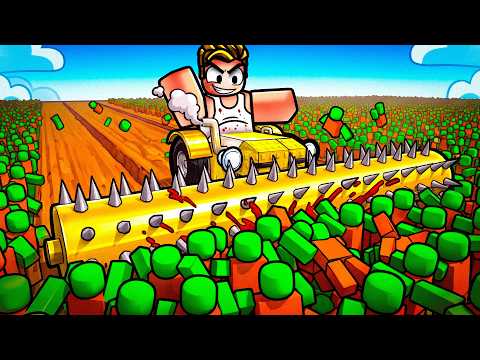 Official mediaMaster Roblox Build and Kill Zombies with our comprehensive guide. Learn the best car builds, skill priorities, and fuel management strategies.YouTube
 Roblox is a platform defined by its creative survival experiences, but few games offer the visceral satisfaction of constructing a custom death machine to mow down the undead. This build and kill zombies guide will help you navigate the complex mechanics of part rolling, vehicle physics, and resource management. If you want to survive the increasingly difficult waves and reach the farthest zones, following a dedicated build and kill zombies guide is the difference between a quick breakdown and a massive cash payout. Whether you are a solo survivor or a cooperative engineer, understanding the nuances of your chassis and engine is vital for long-term success.
Getting Started: The Core Gameplay Loop
At its heart, this experience is a "build-and-run" simulator. You start with a very basic, underpowered vehicle chassis and a dream of destruction. The primary loop involves driving into the field, running over as many zombies as possible before your fuel runs out, and returning to base to spend your earnings.
Every zombie killed provides Cash, which is the lifeblood of your progression. You use this Cash to "roll" for new parts. These parts range from basic structural blocks to high-powered turrets and massive fuel barrels. Community reports suggest that the early game is the most difficult phase, as your initial fuel capacity is extremely limited, often resulting in short runs that yield low profits.
| Action | Key / Control | Function |
|---|---|---|
| Movement | W, A, S, D | Steer and accelerate your vehicle |
| Jump | Spacebar | Navigate obstacles or recover from flips |
| Interact | E | Open menus or interact with the shop |
| Drive / Return | F | Toggle driving mode or teleport back to base |
The Mechanics of Rolling for Parts
Unlike traditional shop-based games, you don't always get to pick exactly what you want. You must roll for parts using your hard-earned cash. As this build and kill zombies guide suggests, understanding the rarity system is crucial for deciding which parts to keep and which to scrap.
Parts are divided into several tiers, including Common, Uncommon, Rare, Epic, Legendary, and Mythic. Each tier significantly boosts the stats of the item. For example, a Mythic engine will provide exponentially more horsepower than a Common one, allowing you to carry a much heavier, weapon-clad chassis without sacrificing speed.
| Rarity | Performance | Strategy |
|---|---|---|
| Common | Low | Use only for basic structure in the first 5 minutes |
| Uncommon | Moderate | Good for early-game fuel tanks |
| Rare | High | The baseline for mid-game weapons |
| Legendary | Very High | Essential for late-game engines |
| Mythic | Extreme | Game-changing utility and power |
Skill Tree Prioritization: Why Luck is King
Before you dump all your money into part rolls, you must visit the Skills menu. Skills provide permanent buffs that apply to your character regardless of what car you are currently driving. According to player experience, the most common mistake beginners make is ignoring the Luck skill.
Luck directly influences the probability of rolling higher-rarity parts. Without investing in Luck, you will find yourself stuck with Common and Uncommon parts even as the zombies become tougher. We recommend upgrading Luck at least four times before focusing on other areas. After Luck, prioritize "Support" slots, which allow you to attach more items to your vehicle without them falling off or causing physics glitches.
| Skill Name | Priority | Effect |
|---|---|---|
| Luck | Maximum | Increases the chance of Legendary/Mythic rolls |
| Support | High | Increases the number of parts you can attach |
| Gold Roll | Medium | Unlocks a specialized roll with higher base rarity |
| Speed | Low | Increases your character's walking speed in base |
Building the Perfect Zombie-Hunting Machine
Construction is handled through the Build menu. You aren't just placing blocks; you are managing weight and balance. If you place all your heavy weapons on one side, your car will flip the moment you hit a ramp. Advanced players in this build and kill zombies guide often recommend a "long and low" design.
Use glass slabs or structural beams to extend the front and rear of your vehicle. This creates more surface area for weapons like rollers, smashers, and double-barrel shotguns. The goal is to maximize your "kill zone"—the area around your car that automatically damages zombies upon contact.
Fuel Management and Distance
The biggest bottleneck in the game is your fuel tank. Small fuel tanks only get you through the first few clusters of enemies. You should aim to roll for "Fuel Barrels" as soon as possible. These barrels provide a massive boost to your range, allowing you to reach the "boost ramps" and higher-value zombie zones.
Community reports indicate that placing fuel barrels near the center of the vehicle is best for stability. If they are placed too high, the vehicle becomes top-heavy. If they are placed too far back, you might perform accidental wheelies that make steering impossible.
Advanced Driving and Cash Farming Strategies
Once your car is built, the way you drive determines your efficiency. You don't always need to hit every single zombie. Sometimes, it is better to weave through the gaps to reach a large cluster of high-value enemies further down the field.
- Use the Ramps: Ramps aren't just for show. They often lead to elevated platforms or "boost" areas that can propel you into new zones.
- Avoid Crowds When Low on Fuel: If your fuel gauge is flashing, stop hunting and start heading back or focus on the closest, easiest kills.
- The "Swerve" Technique: Instead of driving in a straight line, gently swerve left and right. This allows your side-mounted weapons to clip more zombies as you pass by.
- Kill Stealing Awareness: In public servers, other players can run over the zombies you were targeting. If a high-level player with a "tank" build is nearby, move to a different section of the map to ensure you get the full cash value for your kills.
The community-led build and kill zombies guide highlights that farming is most efficient when you focus on "loops"—driving out, hitting a specific cluster, and returning before you are completely empty. This minimizes the time spent waiting for the "Return to Base" cooldown.
Cooperative Building: The Power of Teamwork
One of the unique features of this Roblox experience is the Co-op mode. By clicking the Co-op button, you can invite friends to build on the same chassis. This is incredibly powerful because it allows multiple players to contribute their best parts to a single vehicle.
One player might have a Mythic engine, while another has Legendary turrets. By combining these, you can create a "Super Tank" that is far more powerful than anything a solo player could build in the same amount of time. Cooperative play also makes farming faster, as the cash earned can often be shared or used to boost the shared vehicle's capabilities.
| Feature | Solo Play | Co-op Play |
|---|---|---|
| Build Speed | Slow | Fast |
| Part Variety | Limited to your rolls | Combined inventory |
| Strategy | Focused on balance | Can specialize roles |
| Efficiency | Moderate | High (with communication) |
The Role of Car Presets
If you find yourself struggling with the physics of building from scratch, look for the "Car Builds" beacon in the base area. These are premade templates that show you how to effectively layout your vehicle. While these presets aren't always "optimal" for the end-game, they provide an excellent baseline for new players.
You can use a preset to get the general shape of a functional car and then swap out the Common parts for the higher-rarity items you've rolled. This ensures your car remains aerodynamic and stable while still benefiting from your best gear. Mastering the build and kill zombies guide tactics involves knowing when to stick to a template and when to branch out into custom, experimental designs.
Conclusion: Becoming a Pro Survivor
Transitioning from a "noob" with a wooden cart to a "pro" with a multi-engine tank requires patience and smart spending. Always prioritize your Luck skill, never underestimate the importance of fuel barrels, and don't be afraid to scrap a build and start over if it feels too clunky. The undead horde is endless, but with the right parts and a bit of engineering, you can turn the apocalypse into your personal piggy bank.
Frequently Asked Questions
What is the most important part in a build and kill zombies guide?
While weapons are flashy, the most important parts are actually the Fuel Barrels and the Engine. Without high-tier fuel and power, you won't be able to reach the zones where the high-paying zombies spawn, regardless of how many guns you have.
How do I get more Cash quickly?
The fastest way to earn Cash is to focus on upgrading your Luck skill early on. Better Luck leads to better parts, which allows you to stay in the field longer. Additionally, look for large groups of zombies rather than chasing single targets to maximize your fuel-to-kill ratio.
Can I save my car designs?
Yes, the game allows you to save your progress, but many players prefer using the Car Presets as a foundation. As you unlock more "Support" slots in the skill tree, you can save increasingly complex designs that incorporate more weapons and armor.
Is it better to play solo or in co-op?
Co-op is generally more efficient for building massive vehicles, as you can pool resources. However, solo play is great for learning the physics of the game and testing out specific weapon synergies without interference. Both modes are viable depending on your playstyle.
Related Guides
Build and Kill Zombies Beginner Guide: How to Construct the Ultimate Undead Smasher
Master the apocalypse with our Build and Kill Zombies beginner guide. Learn about part rarities, skill upgrades, and car construction to survive.
Build and Kill Zombies Tips and Tricks: The Ultimate Guide to Surviving the Horde
Master the art of vehicle construction in Roblox with these Build and Kill Zombies tips and tricks. Learn to roll for parts and maximize your cash flow.
Build and Kill Zombies: How to Play and Survive the Apocalypse in Roblox
Master the undead with our ultimate guide on how to play Build and Kill Zombies. Learn to build your death machine, upgrade weapons, and survive the waves.
Mastering the Build and Kill Zombies Controls: A Complete Beginner’s Guide
Learn everything about the Build and Kill Zombies controls, how to upgrade your vehicle, and tips for dominating the undead in this comprehensive guide.