
Build and Kill Zombies Beginner Guide: How to Construct the Ultimate Undead Smasher
Master the apocalypse with our Build and Kill Zombies beginner guide. Learn about part rarities, skill upgrades, and car construction to survive.
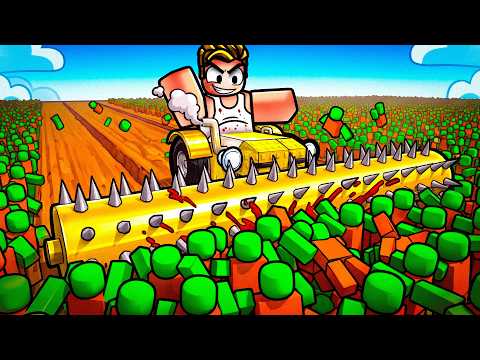 Official mediaMaster the apocalypse with our Build and Kill Zombies beginner guide. Learn about part rarities, skill upgrades, and car construction to survive.YouTube
 Surviving the apocalypse on Roblox requires more than just guts; it requires a heavy-duty, customized war machine capable of plowing through endless hordes. If you are just starting your journey, this build and kill zombies beginner guide will walk you through the essential mechanics of construction, combat, and resource management. Mastering the loop of rolling for parts and upgrading your skills is the only way to survive the later waves, making a comprehensive build and kill zombies beginner guide your most valuable tool for long-term progression.
Understanding the Gameplay Loop
Build and Kill Zombies is a high-octane experience where your success is directly tied to your engineering skills. The game operates on a simple but addictive cycle: roll for parts, attach them to your vehicle, drive into the field to slaughter zombies, and return to base with cash to start the process over again.
In the beginning, your vehicle is little more than a slow-moving chassis. You will quickly find that your fuel runs out before you can reach the high-value zombie clusters. This is why the early game is focused entirely on efficiency. Every dollar earned from running over a zombie should be reinvested into your vehicle's capabilities.
Essential Controls for New Players
Before you start welding spikes to your bumper, you need to know how to navigate the interface and the battlefield.
| Action | Control Key | Description |
|---|---|---|
| Movement | W, A, S, D | Steer and accelerate your vehicle. |
| Jump | Spacebar | Useful for clearing small obstacles or getting out of tight spots. |
| Interact | E | Open menus or interact with base beacons. |
| Drive / Return | F | Transition from the build area to the field and back. |
| Skills Menu | Click UI | Access character and vehicle permanent upgrades. |
The Rolling System: Getting Better Parts
You don't just buy parts in this game; you "roll" for them. This adds a layer of RNG (random number generation) that determines whether you get a standard metal plate or a legendary laser turret. According to community reports, players should focus on specific categories early on rather than rolling randomly.
When you access the roll menu, you can select categories such as Weapons, Supports, or Engines. For a beginner, balancing these is crucial. If you have too many weapons but no engine power, you won't move. If you have a massive engine but no fuel, you won't get far.
Part Rarities and Their Impact
Every part you roll belongs to a rarity tier. The higher the rarity, the better the stats, but the lower the chance of obtaining it.
| Rarity Tier | Color Code | Performance Level |
|---|---|---|
| Common | White | Basic functionality, heavy weight. |
| Uncommon | Green | Slight stat boosts, better durability. |
| Rare | Blue | Significant improvements in speed or damage. |
| Epic | Purple | Advanced parts with unique attributes. |
| Legendary | Gold | Top-tier performance, often essential for late-game. |
| Mythic | Red/Pink | Extremely rare, game-changing power. |
Prioritizing Skill Upgrades
One of the biggest mistakes highlighted in this build and kill zombies beginner guide is ignoring the Skills menu. Cash shouldn't just go toward rolling for parts; it needs to go into permanent stat increases for your account.
Player experience suggests that "Luck" is the most important early-game skill. By upgrading your Luck at least four times immediately, you significantly increase the probability of rolling Rare and Epic parts. This saves you thousands of dollars in the long run because you won't be wasting rolls on Common trash.
The Best Skill Upgrade Order
| Priority | Skill Name | Why it Matters |
|---|---|---|
| 1 | Luck | Increases the chance of getting high-rarity parts from rolls. |
| 2 | More Support | Allows you to attach more structural blocks to your vehicle. |
| 3 | Gold Roll | Unlocks a specialized roll category for better gear. |
| 4 | Engine Power | Increases the base speed and torque of your vehicle. |
Building Your First Zombie-Hunting Vehicle
When you first start building, your chassis is small. You can use "Glass Slabs" or other support blocks to extend the frame of your car. This provides more surface area to mount weapons and fuel tanks. However, be careful—adding too much weight without a corresponding engine upgrade will make your car sluggish.
Essential Parts for Beginners
- Small Engines: These are your bread and butter. Place them near the rear of the vehicle to ensure you have enough torque to push through zombie clusters.
- Fuel Tanks: You will start with very little range. Adding small fuel tanks is necessary, but the "Fuel Barrel" is the item you really want. It provides a massive boost to your distance.
- Roller Blades: These act as melee weapons for your car. Mounting them on the sides or front allows you to slice through zombies without losing too much momentum.
- Double Barrels: These are early-game projectile weapons that can clear a path before you even reach the horde.
Beginner Build Order Table
| Phase | Focus Area | Recommended Parts |
|---|---|---|
| Initial | Extension | Glass Slabs, Basic Frames |
| Mobility | Fuel & Speed | Small Engines, Small Fuel Tanks |
| Offense | Contact Damage | Roller Blades, Green Smashers |
| Sustainability | Range | Fuel Barrels, Large Engines |
Advanced Driving and Combat Tactics
Driving in Build and Kill Zombies isn't just about holding down the 'W' key. The physics engine reacts to how you hit the undead. If you hit a large group head-on at low speed, they might actually stop your car, leaving you vulnerable.
Community reports indicate that using ramps found throughout the field is a great way to bypass dense, low-value crowds and reach the "Boss" zombies or higher-value zones. However, jumping consumes a significant amount of fuel, so ensure your tanks are upgraded before attempting stunts.
Managing Your Fuel
Fuel is the primary gatekeeper of your progress. In this build and kill zombies beginner guide, we emphasize that running out of fuel in the middle of a field is the most common way to end a run.
- Small Tanks: Good for short bursts and early farming.
- Fuel Barrels: Essential for reaching the second and third zones.
- Weight Management: Remember that every fuel tank adds weight. If your car is too heavy, the fuel won't last as long because the engine has to work harder.
Co-op Building: Teamwork Makes the Dream Work
One of the unique features of this game is the Co-op mode. You don't have to face the horde alone. By clicking the Co-op button, you can invite friends to your base. This allows you to pool resources and build a massive "Mega-Tank" together.
In a co-op setting, one player can focus on rolling for high-end weapons while the other focuses on structural integrity and engines. This division of labor often leads to much more powerful vehicles than a solo player could achieve in the same amount of time. You can even drive each other's vehicles to test out different builds.
Using Car Presets
If you find the free-form building a bit overwhelming, the game offers a "Car Builds" beacon. Walking into this area allows you to see pre-designed blueprints. If you have the required parts in your inventory, the game can auto-assemble these for you.
While these presets are rarely "optimal" for high-level play, they provide a fantastic baseline for beginners. You can take a preset tank and then customize it by adding your own Legendary weapons or extra fuel barrels to make it truly yours.
For more information on Roblox experiences and community events, check out the official Roblox Blog for updates on game mechanics and developer news.
Conclusion
Building a successful zombie-slaying machine is a marathon, not a sprint. By following this build and kill zombies beginner guide, you now have the knowledge to prioritize your skill points, manage your fuel, and roll for the best possible parts. Start small, focus on your Luck stat, and eventually, you’ll be driving a massive tank that makes the undead look like minor speed bumps.
FAQ: Build and Kill Zombies Beginner Guide
How do I get more cash quickly as a beginner?
The best way to earn cash early on is to focus on short, frequent runs. Don't try to reach the furthest zones immediately. Instead, run over the initial clusters of zombies, return to base using the 'F' key, and reinvest that money into Small Engines and Luck upgrades.
What is the most important skill to upgrade first?
According to most experienced players, Luck is the most important skill. Upgrading Luck increases the rarity of the parts you get from rolls, which significantly boosts your car's power without needing a massive amount of parts.
Can I play Build and Kill Zombies with my friends?
Yes! The game features a built-in Co-op mode. You can invite friends to your server to build a single vehicle together or drive in a convoy to take down larger waves of zombies more efficiently.
Why does my car keep stopping when I hit zombies?
This usually happens because your vehicle lacks "Torque" or "Engine Power." If your car is too heavy or your engine is too weak, the physical impact of hitting a zombie will kill your momentum. Try adding more engines or removing unnecessary heavy blocks to maintain your speed. Using this build and kill zombies beginner guide strategy of balancing weight and power is key to maintaining a high kill count.
Related Guides
Build and Kill Zombies Tips and Tricks: The Ultimate Guide to Surviving the Horde
Master the art of vehicle construction in Roblox with these Build and Kill Zombies tips and tricks. Learn to roll for parts and maximize your cash flow.
Build and Kill Zombies: How to Play and Survive the Apocalypse in Roblox
Master the undead with our ultimate guide on how to play Build and Kill Zombies. Learn to build your death machine, upgrade weapons, and survive the waves.
Mastering the Build and Kill Zombies Controls: A Complete Beginner’s Guide
Learn everything about the Build and Kill Zombies controls, how to upgrade your vehicle, and tips for dominating the undead in this comprehensive guide.
The Ultimate Build and Kill Zombies Cash Farming Guide: Maximize Your Profits
Master the roads with our comprehensive Build and Kill Zombies cash farming guide. Learn the best routes, boss strategies, and tips to upgrade your car fas